

If you are asking yourself “How do I register on the Central Digital Platform?” this month’s blog post takes you through the key steps involved. If you are going to bid for a public sector tender, that is regulated by the Procurement Act 2023, this registration is essential.
Before you start…
Have your up-to-date company information to hand (including company number, details of key people associated with the business, accounts, accreditations and trade assurances), so you have everything you need ready, to make registering an easy process. You will also need to set-up multi factor authentication, so be prepared for this too (via mobile phone or app).
Firstly, you need to navigate to the Find a Tender website, as it is from here that you will register for the Central Digital Platform:
https://www.find-tender.service.gov.uk/Search
1. In the pale grey block (second panel on the page under the black static header), it states “How you sign in to Find a Tender has changed” and provides a link to “Sign in with One Login” (see red arrow below).
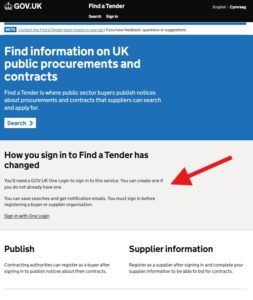
2. You will need to create a single sign in to the GOV.UK to complete the registration (unless you already have a One Login set up, in which case you will be able to log in at the same link).
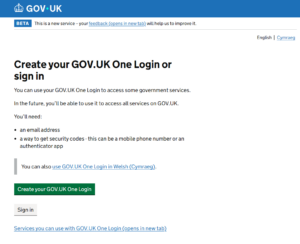
3. You will also need to create multi factor authentication (using a phone app or text).
4. Once you have logged in, you need to complete your “Supplier Information”. this, in essence, is the registration with the central digital platform.
5. Complete the questions in each of the six sections. You will need:
-
- your latest accounts ready to upload to the financial section.
- your trade assurance and any other certifications (e.g. ISO certificates, NICEIC, CHAS) ready to enter the details.
6. Once all sections have been answered, you will be able to create a share code and also download a zip file. Save both the share code and the zip file somewhere accessible. These are now needed for all tenders that fall under the procurement regulations – you will be asked to share one or both of them as part of tender submissions.
Useful notes:
- If you haven’t already, consider setting up saved searches on the Find a Tender platform, using CPV codes or keywords, and your relevant geographic region. You can find further information on creating tender searches here: https://tendervictory.co.uk/where-to-start-finding-tenders/
- It is your responsibility to keep the listing up to date. If there is a significant change in your business, the details held in this system should also be updated. For example, when your latest company accounts are submitted to Companies House, or if a director (or PSC) leaves, your CDP saved supplier information should also be updated to reflect this.
- Once you have completed your initial registration, you can add others from your business, so that they can gain access. If you don’t undertake this step you will need to consider if the multifactor authentication method is available to other members of your business? If it is connected to your mobile phone, can your colleagues access it when you’re on annual leave?
If you would like further guidance or support on registering for the Central Digital Platform, or want to learn how we can help you to submit winning tenders, please contact us: admin@tendervictory.co.uk